


OmniWatch: Scam Protection Pro
3.956.00 Reviews
App Specs
- Version
- 1.2.16
- Updated On
- License
- Free
- Downloads
- 50,000+
- Developer
- Pubrec, LLC
- Categories
- Finance
- Platform
- Android
Screenshots

 Analysis by AppCompare
I judge a scam-protection app less by how reassuring its dashboard looks than by whether it helps me pause before a risky click. That is the central appeal of OmniWatch: Scam Protection Pro: it is a finance app from Pubrec, LLC built around warnings intended to make suspicious online activity easier to notice. I would treat it as a layer of caution, not a substitute for checking who is contacting me and where a link leads.
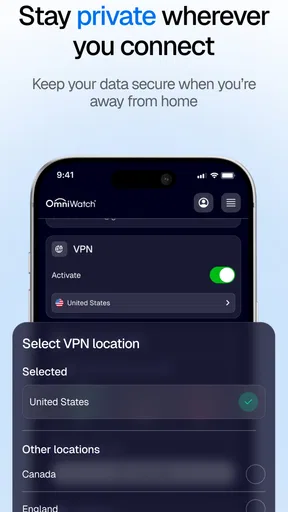
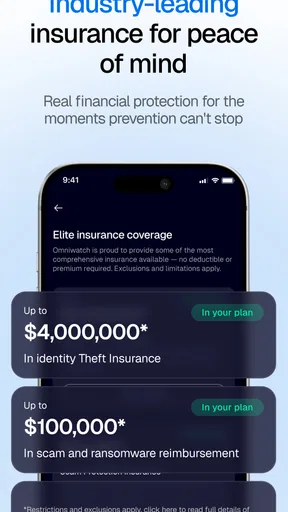
There is also a broader bundle behind the name: its store summary points to scam protection, VPN and antivirus tools, along with identity-theft insurance coverage. That combination may suit someone who wants security-related features together rather than assembling separate apps. The important practical question is whether that breadth matches your routine, especially since the app is free to install but offers in-app purchases ranging from $13 to $400 per item.
What a warning can—and cannot—do
The useful role of scam detection is to interrupt a decision at the right moment. A warning is most valuable when I am moving quickly: opening a delivery message, following a link from a social post, or responding to a supposed account alert. It can prompt me to stop and verify the sender through a separate route instead of trusting the message just because it looks polished.
That distinction matters. A security app can help identify risks, but it cannot make every unfamiliar message fraudulent or every unflagged page safe. I would still avoid entering a password or payment details after following an unsolicited link. I would open the service’s official app or type its address myself, then check whether the request is real. The best use of a warning is as a reason to investigate, not as the only evidence I need.
How I would fit it into a normal day
Imagine I receive a text saying a parcel is delayed and asking me to confirm a small delivery charge. I might be tempted to tap while standing in line or juggling errands. If a protection tool flags the link, the useful next step is not to keep trying it; it is to close the message and check delivery details in the retailer’s or carrier’s own app. If no warning appears, I would still use that safer route because a clean result is not proof of legitimacy.
This is where a tool like OmniWatch can be useful to people who are less confident judging links, or to anyone who handles a lot of unexpected messages. It creates a chance to reconsider before sharing information. It is less likely to change the habits of someone who already ignores unsolicited links and carefully verifies financial requests, though that person may still value having another layer available.
How it compares with familiar security choices
Many people rely on a phone’s built-in protections, cautious browsing, or a standalone antivirus or VPN. OmniWatch’s broader security framing may be appealing if you prefer one place to explore scam, privacy, and device-protection options. On the other hand, a focused specialist app can be easier to evaluate when you only need one function, and built-in protections may be enough for someone who wants a simple setup without another service to manage.
Worth Reading Before You Choose

EA SPORTS FC Mobile 26 Is a Bigger Football Game, but It Takes Time

Flipboard Shows What News Apps Must Do Beyond the Feed

Switching to Android Auto Means Rethinking Your Driving Routine

Google Calendar Makes a Crowded Week Easier to Manage

Ludo King Makes the Most of the Minutes Between Plans

Baby Panda World Brings Quick Play to Modern Phones, but Its Game Library Feels Busy
I would compare the actual plans and terms before paying for anything. The presence of insurance coverage in the summary is not a reason to assume every incident qualifies or that a claim is automatic. Anyone considering a purchase should read the applicable coverage details, check what the selected item includes, and decide whether those terms address their particular concern. A broad bundle is only a better deal if you will use its parts and understand their limits.
First Impressions and Setup
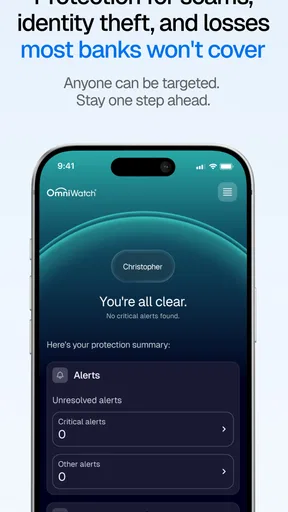
From the get-go, OmniWatch: Scam Protection Pro makes a solid impression. The installation process was smooth and didn't require any complicated setup. I simply downloaded it from the app store, and within minutes, I was ready to roll. The app’s interface is clean and intuitive, with a straightforward dashboard that makes navigation a breeze.
Once you open the app, you're greeted with a brief tutorial that walks you through its main features. I appreciate this touch, as it sets you on the right path to making the most of the app's capabilities. The developers clearly paid attention to user experience, ensuring even tech novices can use the app effortlessly.
Features Galore
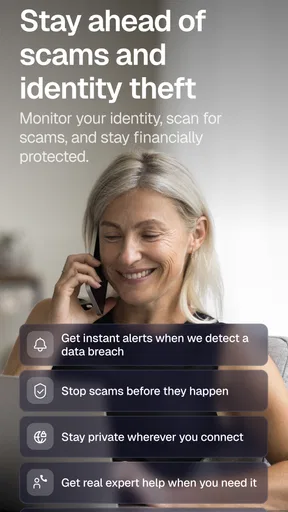
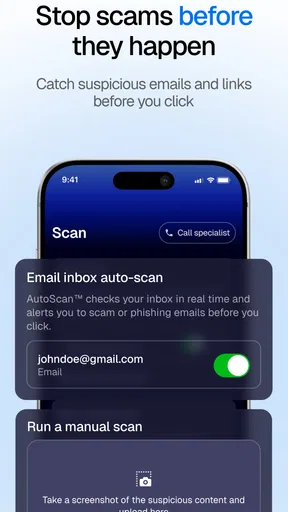
Now, let's talk about what this app offers. The core functionality revolves around scam detection and prevention. OmniWatch: Scam Protection Pro scans incoming messages, emails, and even social media interactions for any signs of fraud. It alerts you immediately if anything fishy is detected.
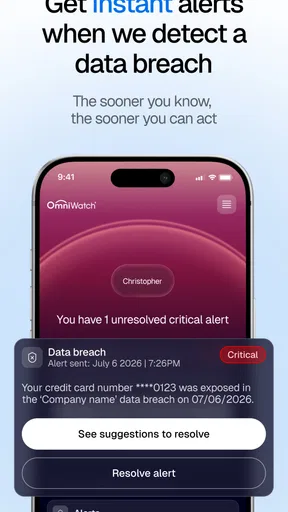
One feature I found particularly impressive was the real-time alert system. I tested it by accessing a few known scam websites, and the app promptly flagged them. This early warning system can be a lifesaver for those who aren't as tech-savvy or who might fall for phishing scams.
The app also includes a comprehensive database of known scammers. This is continuously updated, ensuring you're always protected against the latest threats. It even provides detailed information about each scam, helping you to spot warning signs and avoid pitfalls in the future.
Performance and Reliability
Performance-wise, the app runs smoothly without any noticeable lag. It's lightweight, meaning it doesn’t drain your phone's battery, which is a big plus for anyone who relies heavily on their device throughout the day. I had no issues with crashes or bugs during my testing period, which speaks volumes about its reliability.
Another aspect worth mentioning is the app's minimalistic notification system. It only alerts you when necessary, so you're not bombarded with constant updates. This is a refreshing change from some other security apps that can be overly intrusive.
Usability and Support
In terms of usability, the app is designed with the user in mind. The settings are easy to customize, allowing you to tailor the level of protection you need. Whether you want to be alerted about every potential threat or just the major ones, you can adjust the settings accordingly.
If you ever run into issues or have questions, the app offers robust customer support. There's a built-in help section with FAQs, and you can reach out to the support team directly from the app. I contacted them with a couple of queries and received quick and helpful responses.
What to check before relying on it
For a family member who tends to trust urgent-looking texts, I would set up the app together rather than simply install it and assume the job is done. We would walk through a sample message and agree on a routine: pause, avoid the message’s link, and reach the company through a known channel. That small habit makes a warning easier to act on and reduces the chance that someone treats an app notification as a guarantee.
I would also spend a few minutes reviewing the protection settings after the first launch. Security apps can feel more useful when their alerts fit the person using them: a cautious user may prefer fewer interruptions, while someone who often shops through links may want a more attentive setup. The trade-off is that more warnings can interrupt ordinary browsing, and fewer can mean less prompting to stop and inspect something unfamiliar.
People often wonder whether they need a VPN and antivirus as well as scam screening. I would not assume the bundled approach replaces every dedicated tool or every safe-device habit. If your main concern is encrypting traffic on public Wi-Fi, compare the VPN’s specific terms and behavior with a specialist option. If you only want help spotting suspicious contacts, a narrower tool may be simpler and easier to assess. The right choice depends on the task, not the number of labels in a bundle.
Where I would draw the line
The app’s free entry point makes it easy to try, but the optional purchases deserve attention before committing. The version listed is 1.2.16, and the app is rated for Everyone; those details help identify the product, but they do not tell me whether a paid tier fits my needs. I would compare the purchase screen with my own priorities and avoid paying for a feature just because it sounds comprehensive. The available price range is wide enough that checking the exact item matters.
Its average rating is 3.8 from around 130 ratings, with roughly 50 written reviews. I see that as a reason to make my own decision rather than treating popularity as a verdict. It has been installed over 50,000 times, but adoption does not establish how well a particular protection feature will work for a particular person. I would start with the free experience, test whether its alerts fit my routine, and only then consider whether any paid option offers something I will genuinely use.
OmniWatch is aimed at a broad audience, and its minimum operating-system requirement is Android 7.0. It was released on March 26, 2025, so anyone comparing it with a long-established security product may reasonably want to pay attention to how the app develops over time. I would also make sure the phone meets the requirement before trying to install it, especially if I were setting it up on an older device for someone else.
Final Thoughts
In a world where scams are becoming increasingly clever, having an app like OmniWatch: Scam Protection Pro feels like a necessity. It offers peace of mind, allowing you to browse, communicate, and shop online without constantly looking over your shoulder.
While no app can offer 100% protection, this one comes pretty close. It’s like having a tech-savvy friend looking out for you, ensuring you stay one step ahead of scammers. Whether you’re a digital native or a casual user, this app is a worthy addition to your smartphone arsenal.
So, if you're concerned about online security and want a reliable companion to keep your digital life safe, give OmniWatch: Scam Protection Pro a try. It's a small investment for a big leap in online security.
My recommendation is most positive for someone who wants scam awareness in a broader security app and is willing to treat alerts as prompts to verify, not permission to proceed. Someone who wants a single-purpose blocker, is uncomfortable with optional purchases, or already prefers their phone’s built-in protections may be better served by a more focused alternative. I would try the free version first, check the terms before buying, and keep the simple rule that no warning can replace careful verification.
Pros
- Comprehensive scam detection features.
- Real-time alerts for suspicious activity.
- User-friendly interface with clear instructions.
- Regular updates with new scam databases.
- Customizable settings for tailored protection.
Cons
- Occasional false positives with alerts.
- Requires a stable internet connection.
- Can drain battery faster than usual.
- Subscription required for premium features.
- Limited support for non-English languages.
FAQs for OmniWatch: Scam Protection Pro
What is OmniWatch: Scam Protection Pro and how does it work?
OmniWatch: Scam Protection Pro is an advanced mobile application designed to safeguard users against various scams and fraudulent activities. It works by continuously monitoring your device for suspicious activity, providing real-time alerts, and offering detailed reports to help you understand potential threats. The app uses cutting-edge algorithms to detect phishing attempts, malware, and other security risks, ensuring your personal information remains secure.
Is OmniWatch: Scam Protection Pro compatible with all Android and iOS devices?
OmniWatch: Scam Protection Pro is compatible with most Android and iOS devices, including both smartphones and tablets. However, to ensure optimal performance, it is recommended to use devices running the latest operating system versions. You can check the app's compatibility with your specific device on the app store page before downloading.
Does OmniWatch: Scam Protection Pro require a subscription, and are there any free features?
OmniWatch: Scam Protection Pro offers both free and premium features. The free version provides basic scam detection and alert functionalities, while the premium subscription unlocks advanced protection features, such as detailed threat analysis and priority customer support. Users can choose a monthly or annual subscription plan that suits their needs, with the option to cancel anytime.
How does OmniWatch: Scam Protection Pro protect my personal data?
OmniWatch: Scam Protection Pro prioritizes user privacy through rigorous data protection measures. The app does not collect or store any personal information without explicit consent. All detected threats and security alerts are processed locally on your device, ensuring your data remains private and secure. Additionally, the app uses encrypted connections to provide safe communication channels.
What should I do if OmniWatch: Scam Protection Pro detects a threat on my device?
If OmniWatch: Scam Protection Pro detects a threat on your device, the app will provide an immediate alert with detailed information about the potential risk. It will offer steps to neutralize the threat, such as deleting a suspicious app or blocking a fraudulent contact. Follow the app’s recommendations to ensure your device remains protected, and contact customer support if you need further assistance.


